Reconcile issued and received CFDI invoices before filing

A missing invoice, a cancelled one or a PPD without its complement moves your monthly VAT and income tax. Seven practices to reconcile CFDI before filing.
Monthly filings are rarely hard because of the math; they are hard because of the data. An issued invoice that never reached the accountant, a received one the supplier cancelled later, an installment payment without its complement: each one moves the month’s VAT or income tax, and most are found after the return is filed. Reconciling CFDI invoices before filing turns those surprises into a one-hour review.
1. Start from what the tax authority sees, not only what you hold
Your XML files are your version; the SAT has its own. The bulk download with your e.firma brings issued and received invoices for a date range so you can compare them with what you already recorded. Run it separately for issued and received, and by month, so every difference has a bounded period.
2. Reconcile by UUID, not by amount
Two invoices can share an amount and a date; the UUID is unique. Cross both lists by fiscal folio and review three groups: in the SAT but not in your books, in your books but not in the SAT, and in both with different amounts.
3. Check status, not just existence
A CFDI can exist and be cancelled. Before crediting or deducting, confirm it is still valid; if it was cancelled after you recorded it, a month already filed now contains data that stopped being valid. The current cancellation scheme may require the recipient’s acceptance, so also review pending requests in your tax mailbox.
4. Follow PPD invoices until their payment complement
When an invoice is issued with installment or deferred payment (PPD), the collection or payment is documented with a payment-receipt complement. For VAT purposes what counts is what was actually paid, so a PPD invoice without its complement should not be treated like a paid one. Keep a list of open PPD invoices and close it every month.
5. Check that each expense meets what the deduction requires
Besides a valid CFDI, Article 27 of the income tax law requires, for example, that certain payments above $2,000 pesos go through banking channels. A useful reconciliation does not stop at “the invoice exists”: it also flags expenses whose payment you cannot prove. Check the current text of the law or ask your accountant about the cases that apply to you.
6. Fix before filing, and leave a record
Ask the supplier to reissue the missing or wrong invoice, and note what you found and who resolved it. If you already filed and a difference appears, comparing calculated against declared tells you how much the result changes before you decide whether an amended return is appropriate.
7. Make it a calendar, not a rescue
Pick a fixed day each month (for example, the fifth business day) to download, reconcile and close PPD invoices. Done monthly, reconciliation takes little time; saved up until the annual return, it is a project.
How it looks in Iurefficient
The tax module gathers issued and received CFDI invoices in a single list, loaded by uploading XML or downloading from the SAT with the taxpayer’s e.firma. You can filter by taxpayer, type (issued, received or both), status (Valid) and date range, or search by UUID, RFC or concept.

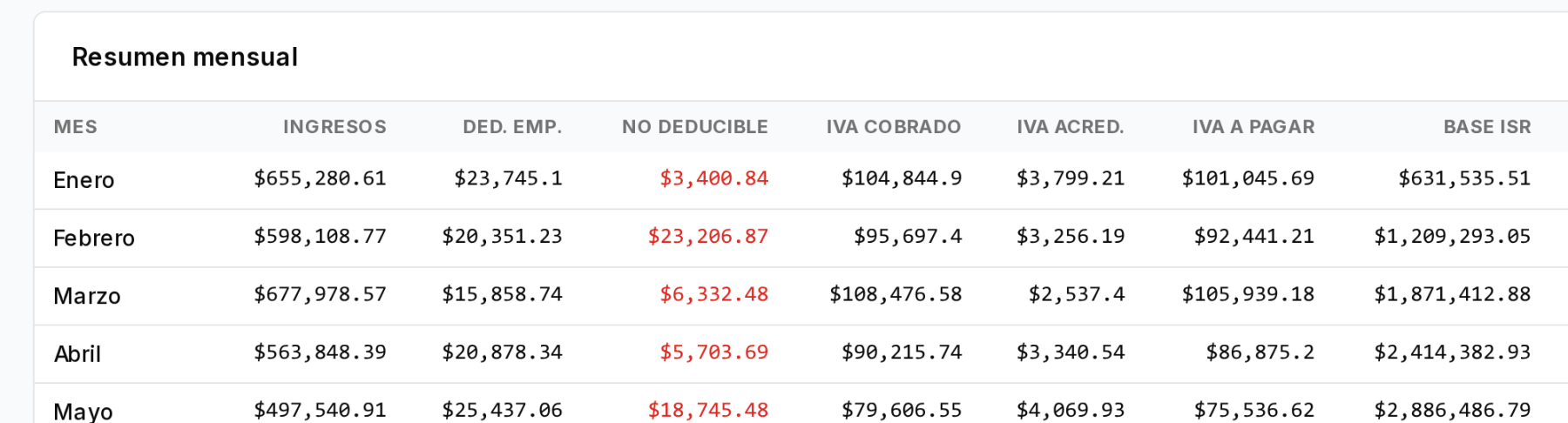
The ISR/IVA report shows, by month, income, deductions, VAT charged, creditable and payable, provisional income tax, and a column for what was declared with its difference, to compare your calculation against what you filed.
This article is informational and does not replace professional advice on a specific case.
¿Quieres ver Iurefficient en acción?
Agenda una demostración o empieza tu prueba gratuita hoy mismo.
Solicitar demo