Tax obligations calendar: no deadline by surprise

The deadline that gets missed is rarely the unknown one, but the one that lived in someone’s memory. Seven practices for a tax calendar the whole firm can consult.
The deadline that gets missed is rarely the unknown one. It is the one “we already knew about”, living in someone’s memory, in a spreadsheet nobody opened that week, or in a personal reminder belonging to someone on vacation. A calendar of obligations works when the firm can answer, without searching, what is due this week, for which client, and who owns it.
These are the practices that help most for a tax firm or accounting team handling several taxpayers.
1. One calendar per taxpayer
Each taxpayer has different obligations depending on their regime, activity and what they have registered with the SAT. Building each calendar from the taxpayer’s compliance opinion and tax status certificate avoids applying the same generic list to everyone. Keep it in one shared place, not in each person’s inbox.
2. Recurring dates, entered once for the whole year
Provisional ISR and VAT payments are, as a general rule, due no later than the 17th of the month following the period, and the DIOT is due no later than the month immediately following the corresponding period (monthly or semiannual, depending on the taxpayer’s option). Annual returns have their own dates: in general, March for legal entities and April for individuals. Enter the full year’s dates in January, and check the SAT portal and the current miscellaneous resolution in case something changed.
2.1 When the 17th falls on a non-business day
The calendar should store the date already shifted, not the rule. Having each person work out the business day “from memory” is a sure source of errors.
3. Two dates per obligation: internal and legal
The legal date is the last day. The internal one is what you give the team: normally three to five business days earlier, to leave room if a CFDI is missing, a client has not sent a bank statement, or the SAT portal fails that day. A calendar is well built when the team works against the internal date.
4. A named owner and a backup
“The department” does not file returns. Each obligation needs one responsible person and another who can take it over if the first is out. Without a backup, the calendar is just recording the risk.
5. Staggered reminders, not a single one
- When the period opens: what needs to be gathered (invoices, payroll, bank statements).
- Midway: what is still missing.
- On the internal date: is the review ready?
- One day before the legal date: only for what is still open.
A single reminder the day before is too late; five reminders for everything end up ignored. It helps if the last one is sent only when something is still pending.
6. Close with evidence, not just a checkbox
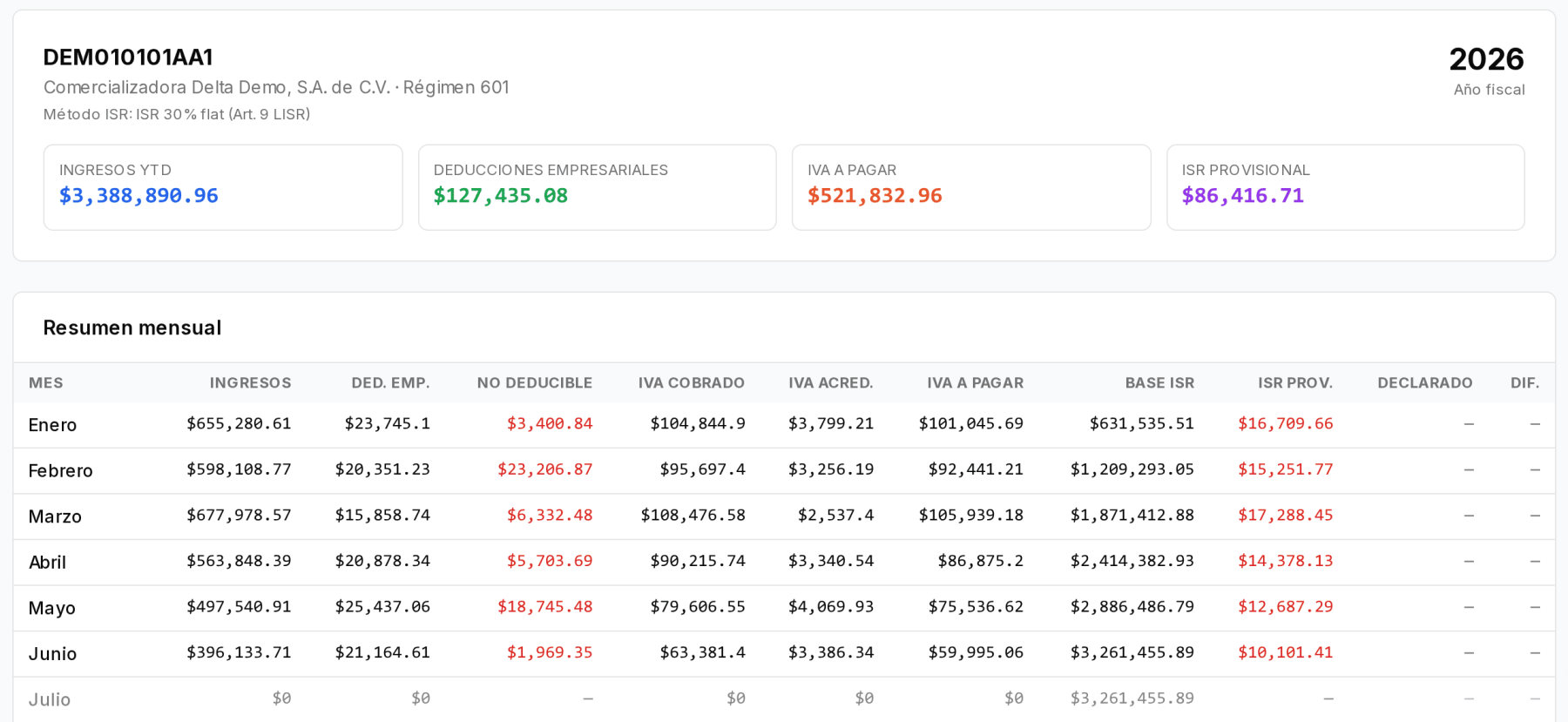
An obligation is complete when the acknowledgment exists and, if a payment was made, the payment receipt. Store them next to that period’s obligation. When the accountant and the system differ, that evidence shows how much was actually filed and paid, and in which month the difference appears.
7. A ten-minute weekly review
A short weekly meeting: what is due in the next ten days, what is at risk, and what is blocked. It needs nothing more than an honest calendar.
How it looks in Iurefficient
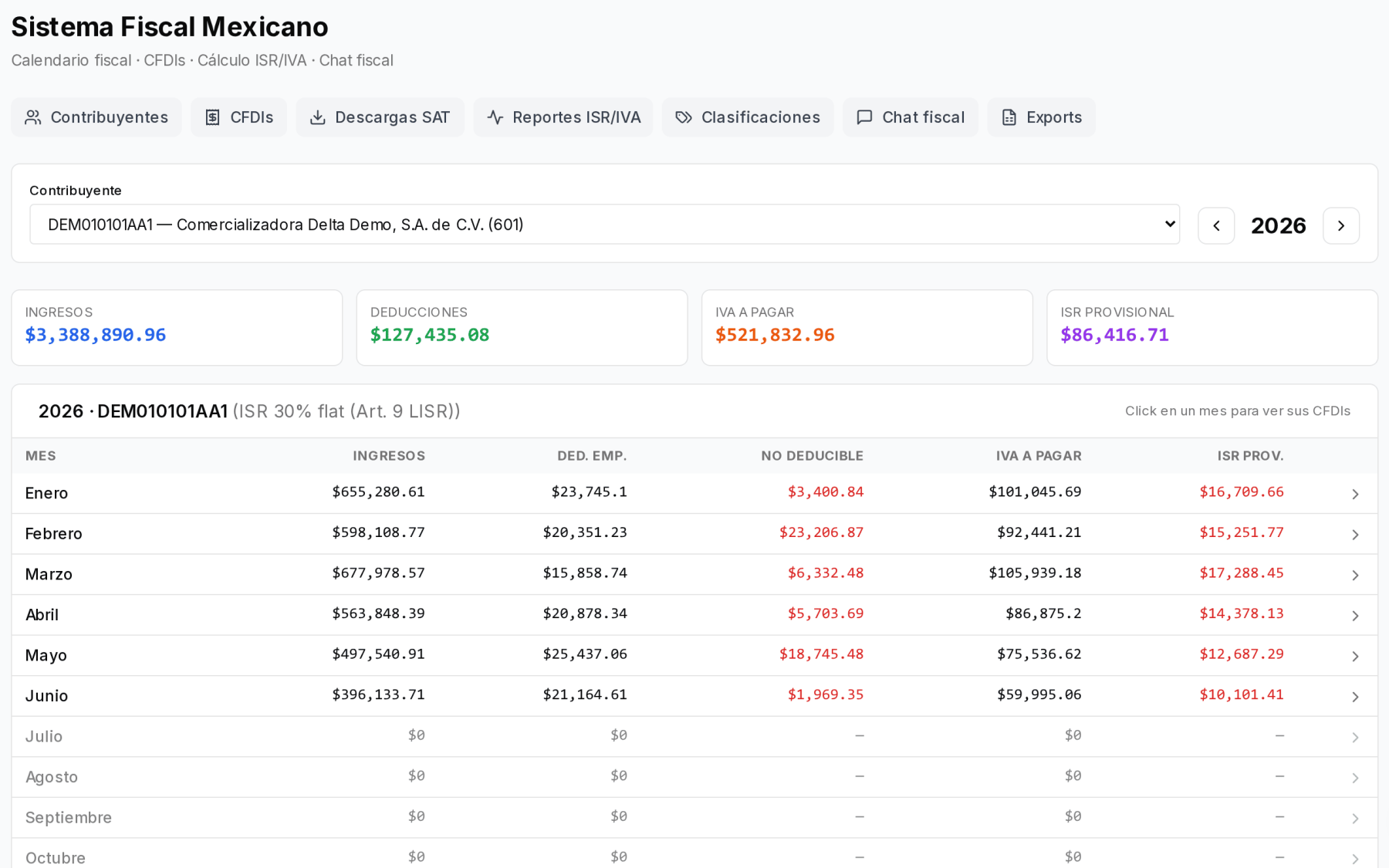
The Mexican Tax System module works by taxpayer and by year. Each taxpayer’s summary shows, month by month, income, deductions, VAT payable and provisional ISR calculated from their CFDIs, so you know which figure is coming before the date arrives.
In ISR / VAT Reports you record what was actually filed and paid, and the table shows the difference against the calculation. It is the evidence from point 6.
The team’s deadlines are tracked as project tasks and deadlines, with an owner, and scheduled alerts can notify through the bell, email or phone, at the time each person chooses.
This article is informational and does not replace professional advice on a specific case.
¿Quieres ver Iurefficient en acción?
Agenda una demostración o empieza tu prueba gratuita hoy mismo.
Solicitar demo