Managing procedural deadlines: the one you can’t afford to miss

A missed deadline can’t be repaired. Seven practices so dates don’t depend on anyone’s memory: a single calendar, a recorded computation, staggered alerts and filing with a margin.
In a law firm almost anything can be repaired: a weak brief can be supplemented, a badly run meeting can be clarified later. A missed deadline cannot. And it is rarely lost for lack of legal knowledge: it is lost because the date lived in someone’s memory, on a sticky note, or in an email nobody opened again. These are the practices that, in my opinion, matter most to keep that from happening.
1. One deadline calendar, not five
If the lawyer keeps one calendar, the assistant another and the firm a third, sooner or later two of them will disagree. Pick a single place where every deadline is recorded, tied to the matter it belongs to, and let everything else be a view of that same data.
2. Record the deadline the same day the notice arrives
Not at the end of the week, nor “when the brief gets drafted”. When the notice arrives you log three things: which procedural act is running, when it took effect, and what period the law sets. Recording it the same day is what makes the calendar trustworthy.
3. Keep the computation, not just the final date
“Due on the 24th” says nothing if someone doubts it two weeks later. Write down where it comes from: notice date, day it took effect, period applied and non-business days excluded. Then someone else can check the calculation in a minute, and so can you when you come back from vacation.
An example from Mexico’s Amparo Law as currently in force (last amended in the Official Gazette on October 16, 2025): the general period to file the petition is fifteen days (Article 17), with exceptions such as thirty days when a self-executing general rule is challenged; it runs from the day after the notice takes effect or after the petitioner learned of the act (Article 18); and business days are all days of the year except Saturdays, Sundays and the holidays listed in Article 19, plus days when the court suspends work. Each subject area and each code has its own rules, which is why the computation should be written down.
4. Separate the legal deadline from the internal one
The statutory period is the one that is not negotiable. But the firm needs its own dates ahead of it: draft ready, partner review, client sign-off, filing. Record them as separate dates, each with an owner. The day the deadline expires is not the day to start writing.
5. Staggered alerts with a clear recipient
A single reminder the day before is not enough. A sequence works better: one alert with room to organize the work, another when only a few days remain, and another on the day itself. And each alert should reach the person responsible and, for critical deadlines, a second lawyer. An alert that goes to everyone is nobody’s responsibility.
6. File with a margin, especially electronically
The Amparo Law allows petitions and deadline filings to be submitted electronically with an electronic signature up to midnight on the day they expire (Article 21). That the law allows it does not mean it is wise to wait until 11:50 p.m.: the expiring signature, the overloaded platform and the oversized file all tend to show up that very day. My personal rule: anything important gets filed the day before.
7. A weekly look at what is coming
Once a week, fifteen minutes with the team, to go over the deadlines of the next ten to fifteen days. It reveals impossible workloads, coverage gaps and dates someone entered wrong. It is the cheapest practice and the one that prevents the most scares.
How it looks in Iurefficient
In Iurefficient, deadlines are part of the matter and appear next to tasks and events in a single calendar, with month, week, day and agenda views. Deadlines are told apart by color and the side agenda lists what is coming.
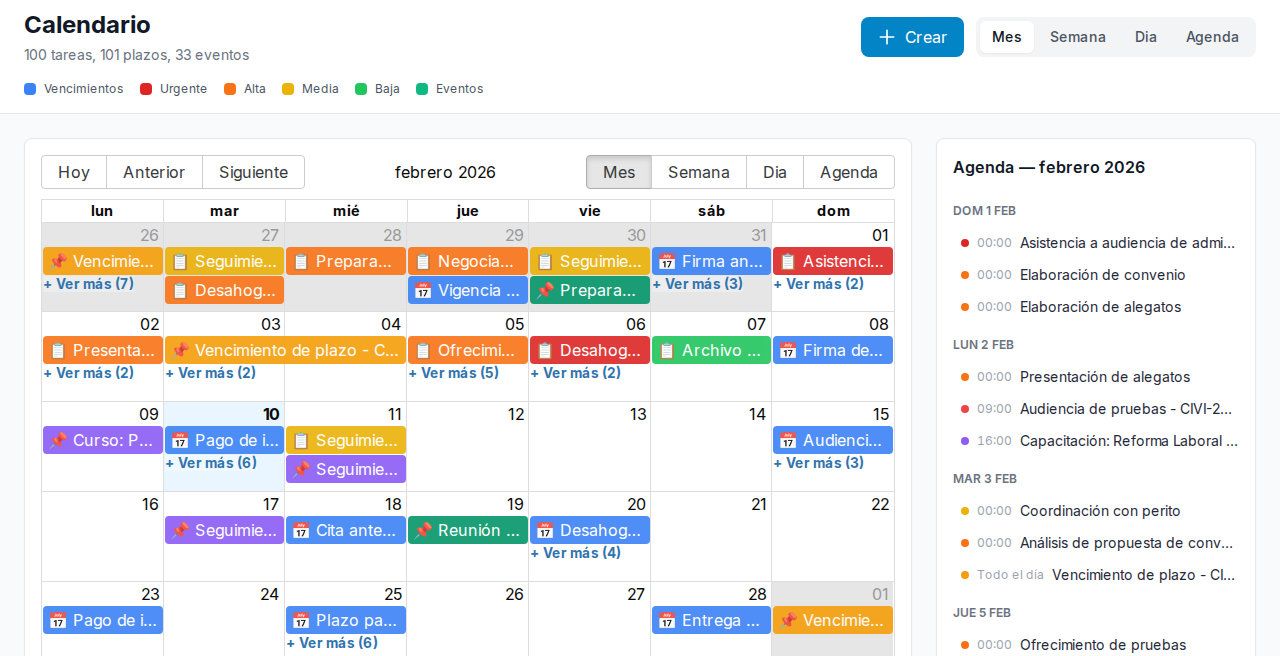
Each person chooses in their profile which channels receive alerts for tasks that are due soon or overdue (bell, email, Telegram or WhatsApp) and can set quiet hours. That way the alert arrives where it will actually be seen.
This article is informational and does not replace professional advice on a specific case.
¿Quieres ver Iurefficient en acción?
Agenda una demostración o empieza tu prueba gratuita hoy mismo.
Solicitar demo