Transcribe meetings without the audio leaving your computer

A recorded meeting nobody transcribes is not worth much. IureTranscribe does it on your own computer with Whisper and leaves the minutes ready to file with the project. How to use it, who it is not for, and how it connects to Iurefficient.
In almost any firm or project office there is a folder of meeting recordings nobody has opened again. An hour of audio cannot be searched, cited or turned into tasks. Transcribing it with a cloud service is the easy way, but it means sending a conversation about clients, prices or strategy to a third party. IureTranscribe is a free, open-source desktop app built for that case: transcription runs on your computer with Whisper and the audio never leaves it.
1. What it does, and what it does not
It transcribes audio and video files (MP3, WAV, M4A, MP4, MOV, MKV, FLAC, OGG) with whisper.cpp. It needs no account and no internet connection to transcribe, and the installer already includes a model. It can also record the meeting for you: microphone and system audio, with a live transcript that tells whether the person recording or the other party was speaking. It outputs SRT, VTT, TXT and JSON and, if you ask, a summary and minutes in Markdown.
2. How to use it, in five steps
- Install the variant that fits your machine. If you do not know which graphics card you have, use the version without GPU: it works on any computer.
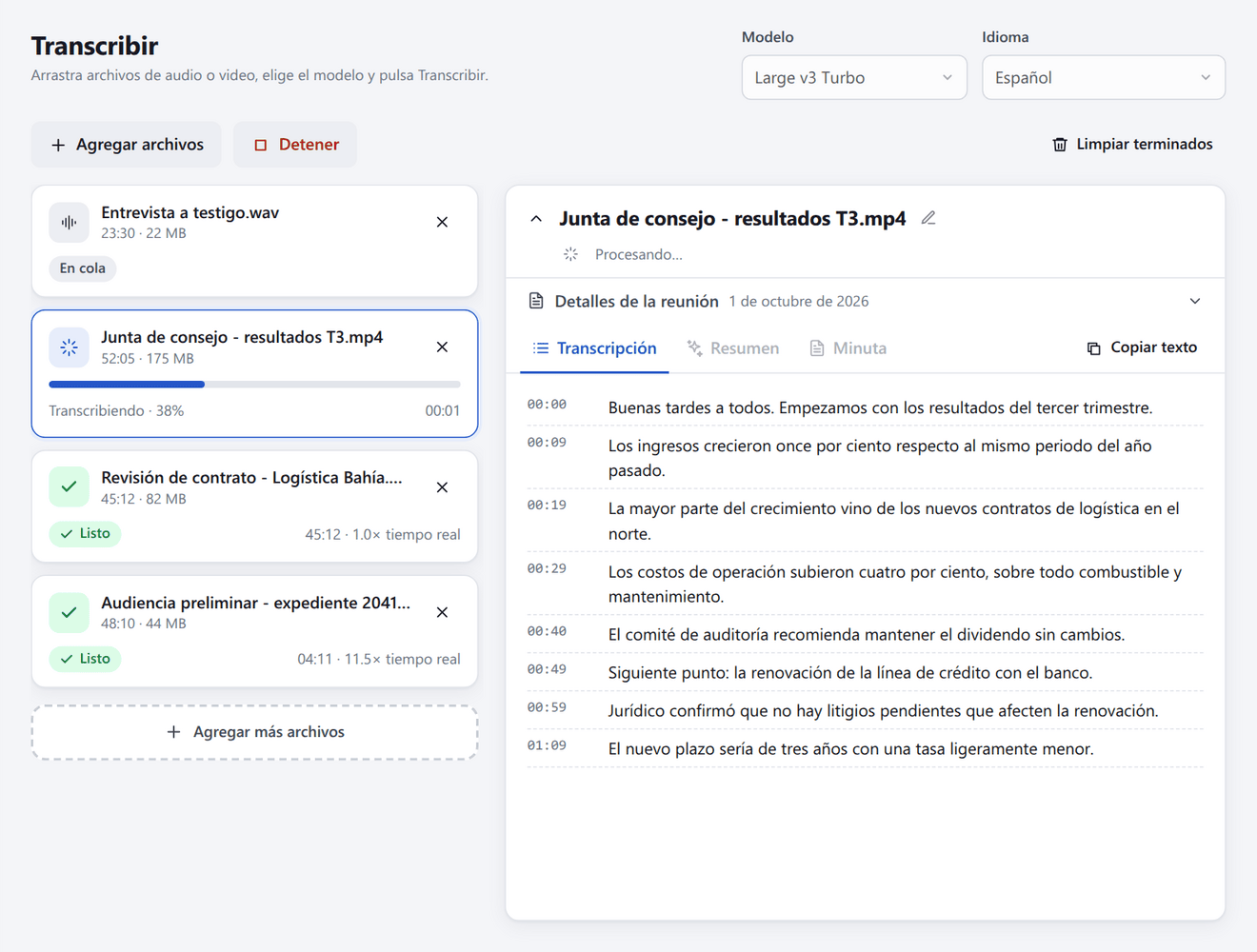
- Drag the files into the queue, or record the meeting from the app itself.
- Pick the model and the language of the audio. Large v3 Turbo is the recommended model, and it downloads from inside the app.
- Enter the meeting details (participants, date, place, notes). You can do it at any time.
- Review the transcript, generate the summary or the minutes, and save the result.
3. Teach it your vocabulary
Whisper gets proper names and trade terms wrong more than anything else. The app lets you give it a list of names and terms as context, plus automatic correction rules for the words it keeps misspelling. It is a ten-minute job that saves hours of cleanup later.
4. Decide who writes the minutes
The transcription is always local. The summary and minutes can be written by OpenRouter with your own key, by your Iurefficient instance, or by the AI assistant you already use (Claude, Copilot) through MCP, with no key at all. That choice defines which text leaves your computer: only what you send to be written.
5. Who it is not for
- If you need a tool that is already code-signed and notarized for machines with strict policies: the Windows and macOS installers are not signed, and the system warns you the first time.
- If you want to transcribe from the browser or from a phone: it is a desktop app for Linux, Windows and macOS.
- If you work on very modest machines with very long recordings: it works without a GPU, but it takes longer. Try it on a real meeting before deciding.
- On macOS, capturing system audio requires a virtual device (for example BlackHole).
How it connects to Iurefficient
If your firm uses Iurefficient, in Settings you enter your instance domain, your email and an app password. From there, every transcribed file has a “Save to Iurefficient” button: you choose the client and project folder, and the transcript, the summary, the minutes and, if you want, the original audio are uploaded. If you save a file with the same name again, it becomes a new version rather than a duplicate.
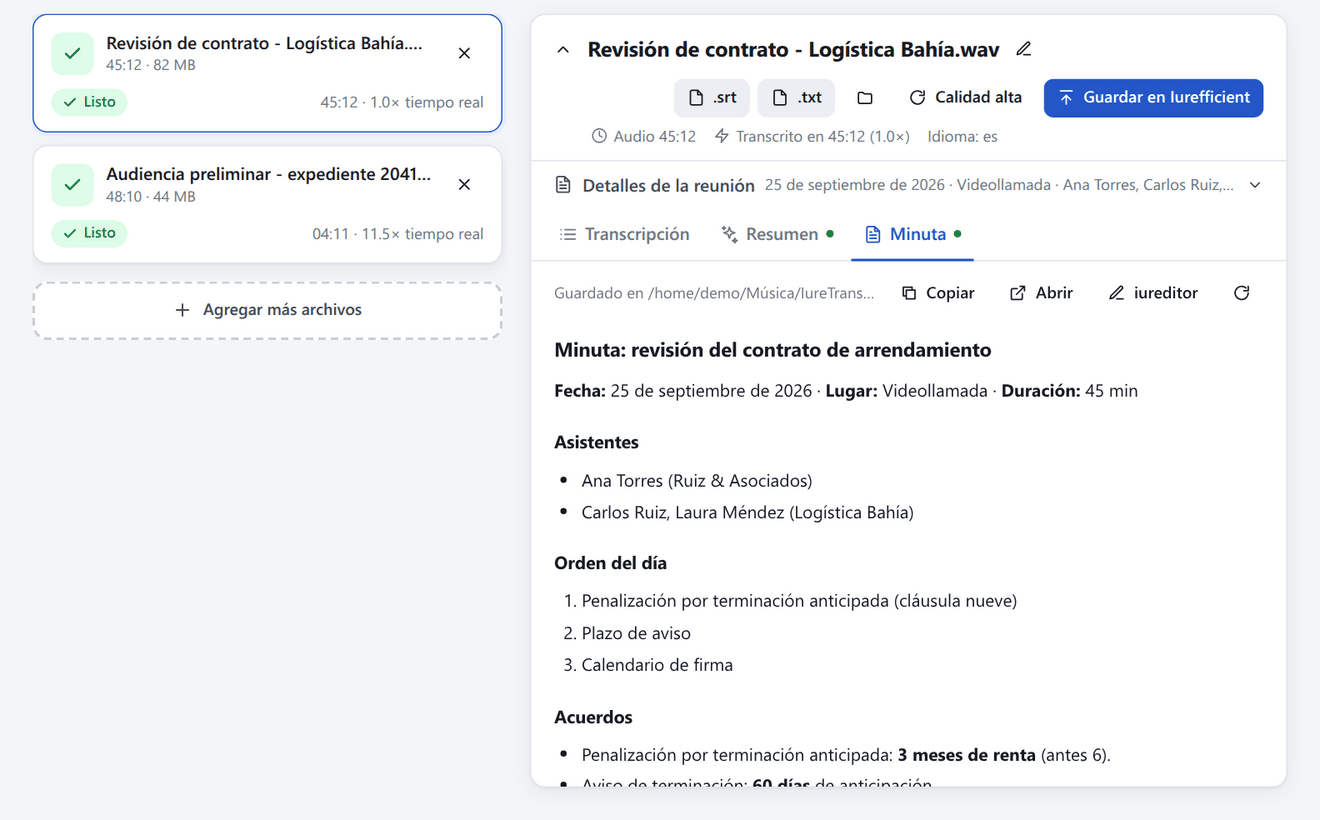
When you are signed in there are two more destinations. In Project you can upload the files to the case file and log the meeting hours as billable time; the minutes tab can also generate the document with one of your firm’s formats, on the instance itself and without an OpenRouter key. In CRM the files are attached to an opportunity or lead and a meeting activity is logged with its duration and summary. And when the minutes are generated by Iurefficient, the commitments it detects can be reviewed, assigned and created as project tasks.
The code and the installers are at github.com/ellaguno/iuretranscribe; the latest published version is v0.8.0.
¿Quieres ver Iurefficient en acción?
Agenda una demostración o empieza tu prueba gratuita hoy mismo.
Solicitar demo