Discover the devices on your network instead of typing them in

The switch in the closet, the backup NAS and the “temporary” access point are almost never in the inventory. iureTI Discovery sweeps the network, classifies each device with its reasons and lets a person decide what goes in.
An IT inventory nearly always starts the same way: someone walks around the office with a spreadsheet, writes down what they see and, three months later, that sheet no longer looks like the network. The devices that matter most — the switch in the closet, the backup NAS, the access point someone plugged in “temporarily” — are exactly the ones nobody records, because no user claims them.
Almost all of those devices already say who they are: they answer SNMP, announce themselves over mDNS or UPnP, expose an admin web page, and carry the vendor in their MAC address. iureTI Discovery is an open-source probe that sweeps the network ranges you give it, gathers those clues and hands back a list of already classified assets, ready for a person to review.
1. The problem it solves
Recording by hand has two flaws: it is slow and it ends up incomplete. The probe changes the order of the work: first you discover what is there, then a person decides what goes into the inventory. For each device it proposes a type (PC, laptop, server, switch, firewall, printer, access point, UPS, NAS…), a confidence score and the reasons behind that classification. If the same device shows up through several sources or in several scans, it is recognized by its serial number, MAC or name and stays a single asset.
It also tells virtual from physical: containers (Docker, Podman, LXC) and virtual machines (KVM, Proxmox, VMware, Hyper-V, VirtualBox, Xen) are flagged as such and linked to the real machine that runs them, instead of inflating the list with twenty “servers” that live in one box.
2. How to use it, in five steps
- Get authorization. Scanning a network without the express permission of whoever is responsible for it is not an IT practice, it is an incident. The tool itself reminds you on its first screen.
- Install the probe inside the network. It runs on Linux (Debian, Ubuntu or Raspberry Pi OS, amd64 or arm64) from a
.debpackage, or as a Docker image. A Raspberry Pi is enough. It only makes outgoing connections. The latest release ships an installer that verifies the package’s SHA-256 checksum before installing it. - Pick the ranges. On the Escaneo (Scan) tab you type the ranges or click the probe’s own networks, and decide whether it queries SNMP with the read-only credentials you configured.
- Review what it found. The Activos (Assets) tab shows IP, name, type with its confidence, vendor and model, serial number, MAC and open ports. Opening a device shows the sources and the reasoning.
- Send or export. With Enviar a iurefficient (Send to Iurefficient), or with a CSV or JSON file if you prefer to import it yourself.
3. Good practices when discovering a network
Read-only SNMP credentials, and scoped. The probe only uses SNMP v2c/v3 to read, and each credential can be limited to its subnets. Do not give it the write community “just in case”.
One probe per site. The probe has to be inside the network it discovers. Head office and a branch are two probes, each with its own site name.
Schedule scans away from peak hours. In service mode, scans are scheduled within a time window. A port sweep at mid-morning breaks nothing, but there is no need for it either.
Distrust low confidence. A “Server 55%” is a hypothesis. Read the reasons before approving it; that is what they are for.
Do not expose the interface. The web interface listens only on 127.0.0.1. On a server with no desktop, the recommended way is an SSH tunnel, not opening it to the network.
Think before turning on online identification. It is optional and off by default. If you enable it, an AI model with web search finds the product’s commercial name, specs and photo. According to its documentation only product data travels (brand, model, firmware, what the device announces and its open ports), never IPs, MACs, hostnames, serial numbers or locations.
4. Who it is not for
The probe does not run on Windows or WSL2, because the office network cannot be seen from there; a Windows-only site needs a Raspberry Pi or a small Linux virtual machine. Its interface is, for now, in Spanish only. And it does not replace a person: it discovers and classifies, but who is responsible for each device, where it is and which project it is charged to is still the work of someone who knows the office.
How it connects to Iurefficient
In Iurefficient, the administrator registers one probe per site in the inventory settings and gets the token the probe enrolls with. From then on the probe sends what it sees and, in the iurefficient column of its list, each device says whether it matches an asset that already exists or is waiting in the tray.
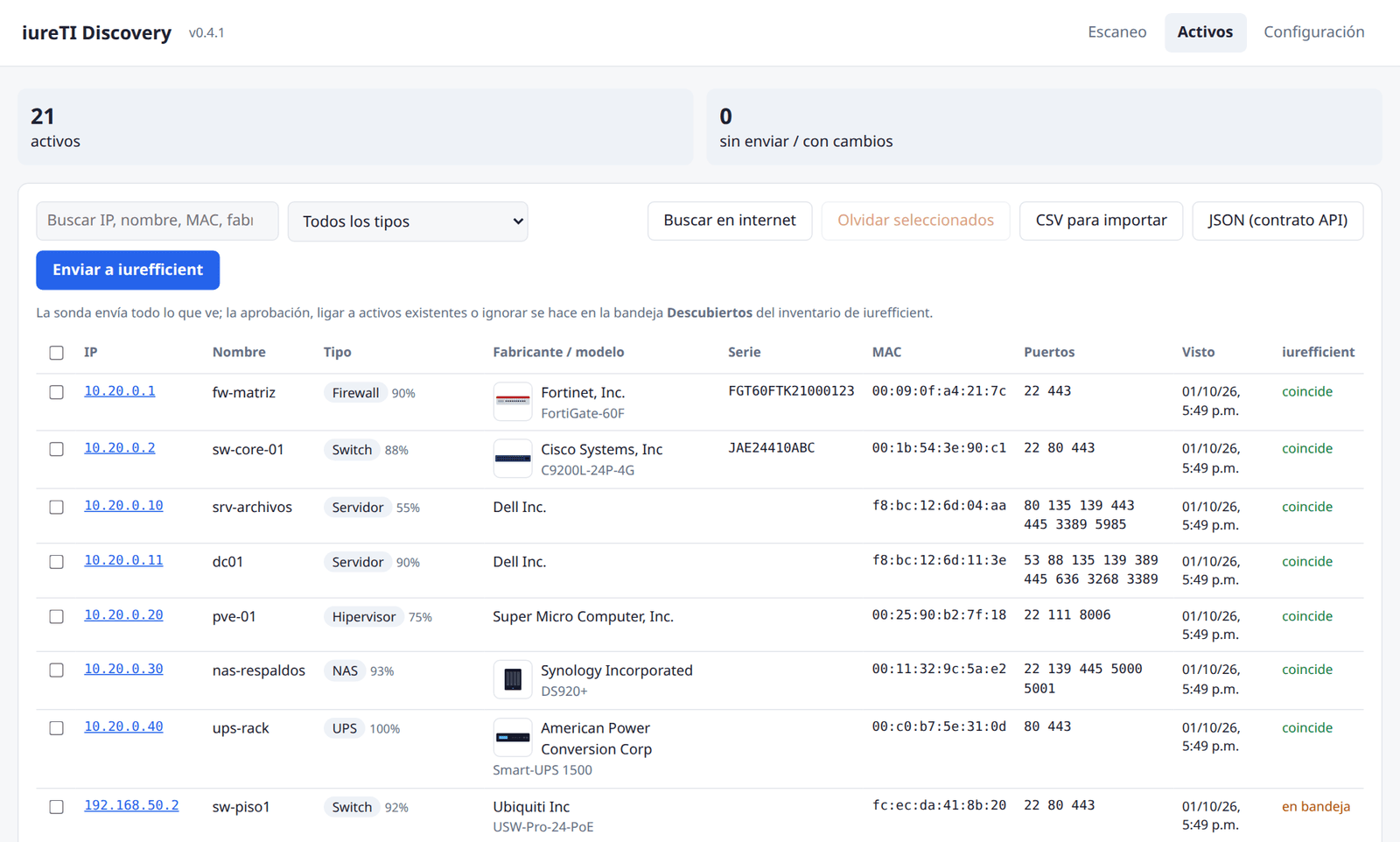
Whatever matches no asset lands in the inventory’s Discovered tray. Nothing gets in by itself: there a person approves it (one at a time or in bulk), links it to an existing asset or ignores it. SNMP credentials and AI keys are never sent; they stay on the probe.
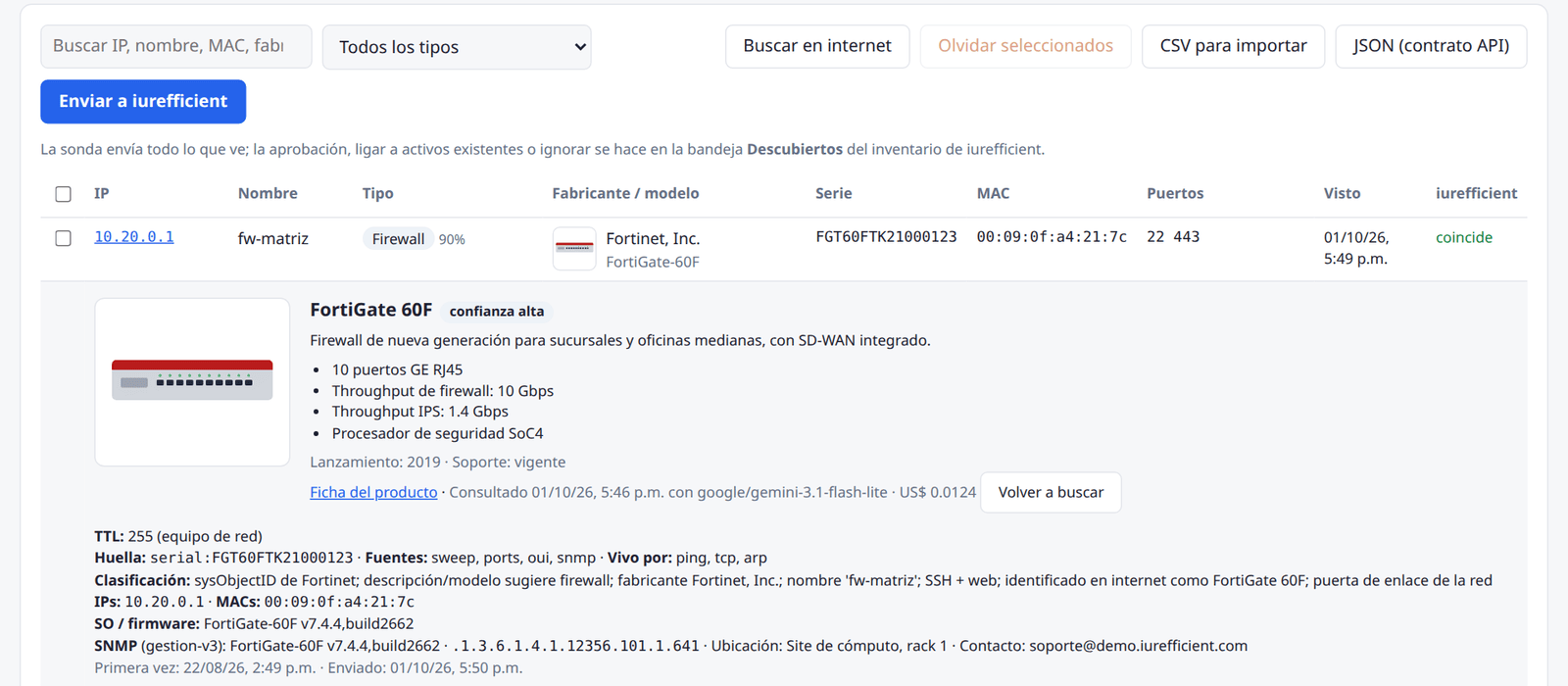
Installed as a service, the probe checks in with Iurefficient every five minutes, receives its configuration from there and sends the results after each scheduled scan. If you would rather not connect it, the CSV it exports can be loaded from Inventory › Import.
iureTI Discovery is open source (Apache 2.0). The code, the documentation and the downloads are at github.com/ellaguno/iureTI.
¿Quieres ver Iurefficient en acción?
Agenda una demostración o empieza tu prueba gratuita hoy mismo.
Solicitar demo