SLA-compliant tickets: classify, prioritize and measure

An SLA nobody measures is a forgotten promise. Six practices for a service desk that delivers: separate response from resolution, prioritize by impact and urgency, honest statuses and three numbers every month.
An SLA nobody measures is a promise written into the proposal and forgotten in operations. The client does remember it: on the day their issue has gone six hours without a response and the contract said four. These are the practices that separate a service desk that delivers from one that fights fires.
1. Separate response time from resolution time
They are two different commitments, and the contract should name them separately. Responding means someone takes the case and tells the client what happens next; resolving means the problem is gone. A team can respond in fifteen minutes and take two days to resolve, and that’s fine if that’s what was agreed. What isn’t fine is measuring one and reporting the other.
2. Priority comes from impact and urgency, not from whoever shouts loudest
The most widespread practice in service management is to calculate priority by crossing two questions: how many does it affect? (impact) and how soon does it become serious? (urgency). A fiscal printer that can’t issue invoices in three branches is high impact and high urgency: nothing can be sold. A report that comes out blank is annoying, but there’s a workaround. Write the table once and always use it: it keeps every ticket from becoming a negotiation.
With priority defined, the SLA becomes a short table. For example, Urgent: respond in 30 minutes, resolve in 4 hours; High: 2 and 8 hours; Medium: 1 and 3 business days. Your contract sets the numbers; what matters is that they exist and the team knows them by heart.
3. Queues by type of work, statuses that tell the truth
A single inbox with everything mixed together forces someone to read all of it to know what’s next. Split queues by client or by type of service, and use few statuses, but honest ones: Open, In progress, On hold (waiting on the client or a third party), Resolved and Closed. “On hold” is the most abused status: use it only when the ball really is in the other court, and record what was requested and from whom.
4. The due time in plain sight before it’s missed
A breach is almost never a surprise: it’s a ticket nobody looked at in time. Every ticket should show when its SLA is due, and an overdue one should stand out without opening any report. The desk’s daily review starts there: what’s about to breach, before what’s newest.
5. Internal notes and client replies, kept apart
The technical diagnosis (“the wave 1 installer didn’t update the driver”) isn’t always what the client needs to read; the notice that the cause is identified and when it will be fixed is. Keep both in the same ticket but marked differently, and have templates for the replies that repeat: acknowledgment, request for information, closure.
6. Measure few things, every month
- Compliance rate for response and resolution, by priority.
- Backlog age: how many open tickets are more than a week old.
- Reopens: a ticket that gets reopened wasn’t resolved.
Three well-measured numbers say more than a twenty-chart dashboard. And clients appreciate getting them before they ask.
How it looks in Iurefficient
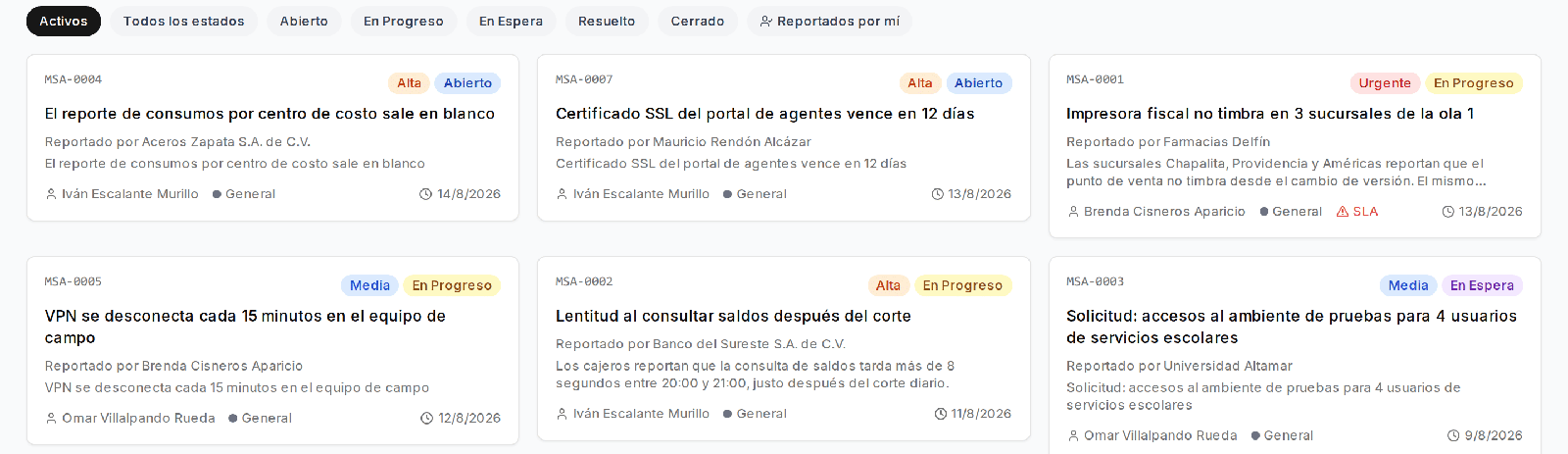
The Tickets & Support module organizes work into queues and statuses —Open, In progress, On hold, Resolved, Closed—, with the priority and who reported it on each card. A ticket that has breached its SLA says so on the card itself, without opening it:
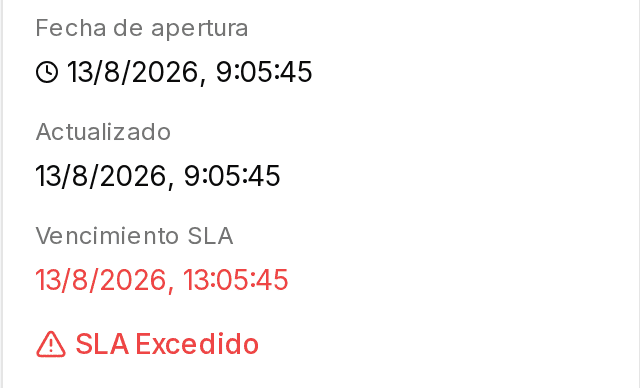
Inside the ticket you have the opening date, the SLA due time and the alert when it’s exceeded; comments distinguish the internal note from the reply to the client, there are templates for frequent replies, and each ticket can be linked to the project it belongs to, so support for an implementation doesn’t live apart from the plan.
The same list can also be viewed as a board by status, filtered by queue or by “reported by me”, and exported for the monthly client report.
¿Quieres ver Iurefficient en acción?
Agenda una demostración o empieza tu prueba gratuita hoy mismo.
Solicitar demo