A knowledge base your team actually uses

Most IT knowledge bases are written to tick a box, not to be consulted mid-incident. Seven practices to make yours get used.
Almost every IT team has a knowledge base. Almost none uses it. It lives in a wiki someone put together over a weekend, the procedures are two years old, and when something goes down people ask whoever “already knows” instead of searching. The tool is rarely the problem: the base was written to tick a box, not to be consulted at 3 a.m.
1. Write from real incidents, not from topics
An article born from “how to restore the database backup” after Tuesday’s outage has the steps that were actually run, stumbles included. One written “just in case” describes how things should be. When an incident closes, the last step is to turn it into an article or update the existing one.
2. A short, fixed format
Have every article answer the same questions in the same order:
- Symptom: what the caller sees or what the alert says.
- Likely cause and how to confirm it.
- Steps, numbered, with commands exactly as typed.
- How to know it worked and whom to escalate to if not.
Someone reading mid-incident doesn’t want background; they want it afterwards.
3. One owner and a review date per article
A procedure with no owner rots. Note who maintains it and when it is reviewed (every six months is enough for most; whenever the system changes for the critical ones). An outdated article should look outdated, not pass for current.
4. Measure what gets read, and what is searched for and not found
Two signals are worth more than any “articles published” figure: which ones get opened, and which searches return nothing. The second is your to-do list, already prioritized. Reviewing it once a month takes ten minutes.
5. Put it where the work already happens
If consulting it means opening another tool with another login, people won’t do it during an incident. Link articles from the ticket, the alert, the team chat. And make sure people can ask in plain language: “how do I set up a VPN?” looks little like the title of the document that explains it.
6. Separate what everyone can see from what they can’t
General guides (“how to request a laptop”) can be open to the whole organization. Credentials, network diagrams and security procedures cannot. Decide from the start what goes on each side; moving a sensitive document after it has been read is too late.
7. When an answer relies on a document, say which one
An assistant that answers without citing forces you to distrust everything; one that says “according to procedure X” lets you go to the source and spot that it is out of date. The citation is what makes an answer verifiable.
How it looks in Iurefficient
Iurefficient has a Knowledge library in Settings: the material the organization works with that belongs to no project, and that the assistant consults when drafting. It is organized into collections with categories, and the documents keep living in Documents: removing one from the library does not delete it.
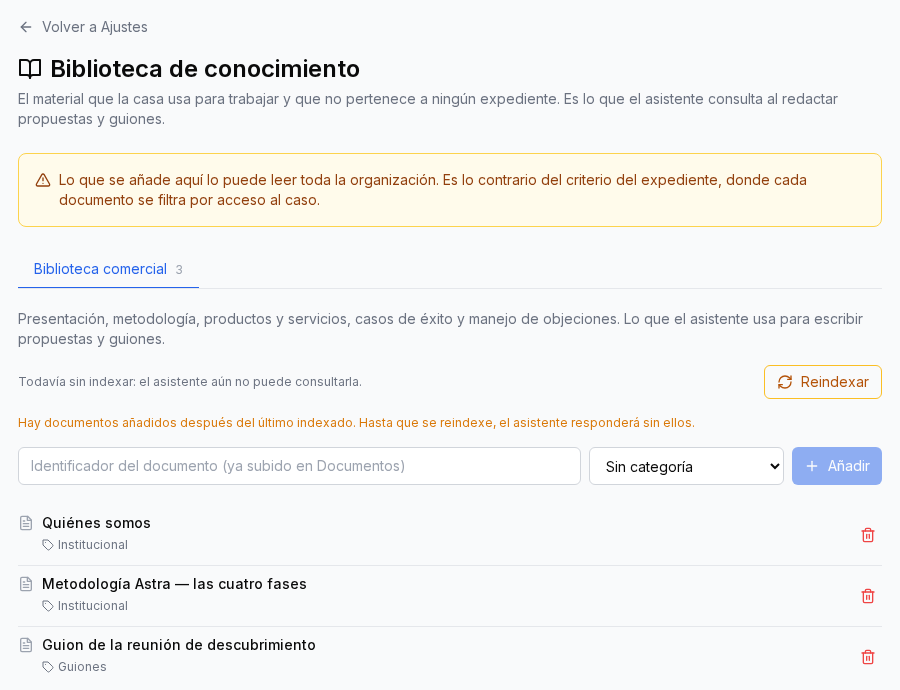
Two details on the screen matter for this practice. First, the amber notice: anything added here is readable by the whole organisation, unlike projects, where each document is filtered by access. That is practice 6 made explicit: general guides yes, credentials no. Second, after adding documents you must press Reindex; until then the assistant answers without them, and the screen says so.
For project answers, the assistant cites the document name and the fragment it relies on, so you can check where each fact came from.
A knowledge base is never finished: it is maintained. Start with the five most frequent incidents of the last quarter, give them an owner and a review date, and check in a month what was searched for without success.
¿Quieres ver Iurefficient en acción?
Agenda una demostración o empieza tu prueba gratuita hoy mismo.
Solicitar demo