The baseline: without it there is no variance to measure

Without a fixed reference, a delay gets argued instead of measured. Seven practices to set the baseline, protect it and move it only through approved changes.
A project slips three weeks and nobody can say for certain relative to what. People talk about “what was promised,” but everyone remembers a different date. Without a fixed reference, variance is not measured: it is argued over. The baseline is that reference: the snapshot of the approved plan that everything else is compared against.
1. Freeze it before execution, not after
A “retroactive” baseline (one assembled when the project is already halfway through) reflects what has already happened, not what was approved. Set it when the sponsor signs off the plan and before the team starts work. If the project started without one, it is better to set it today and say so than to rebuild it from memory.
2. Cover all three: scope, time and cost
A delivery date alone is not enough. A useful baseline stores, task by task:
- Planned start and finish dates.
- Estimated effort in hours.
- The approved scope (the task structure) and the cost and price totals.
That lets you answer three different questions: are we late? are we spending more hours than planned? has the scope grown?
3. Don’t touch it to make the numbers look better
It is the most common temptation: the project slips, so the plan is “adjusted” and the variance disappears from the dashboard. But a baseline that moves at convenience stops measuring anything. The rule is simple: the baseline only changes through an approved change.
4. Every approved change creates a new baseline, and the previous one is kept
When the client asks for more scope and it is agreed, the plan does change, and it is legitimate for the reference to change with it. What matters is traceability: version 1 is still there, version 2 is tied to the change that caused it, and anyone can see how far the project has moved from the original plan.
5. A change is an order with impacts, not a note
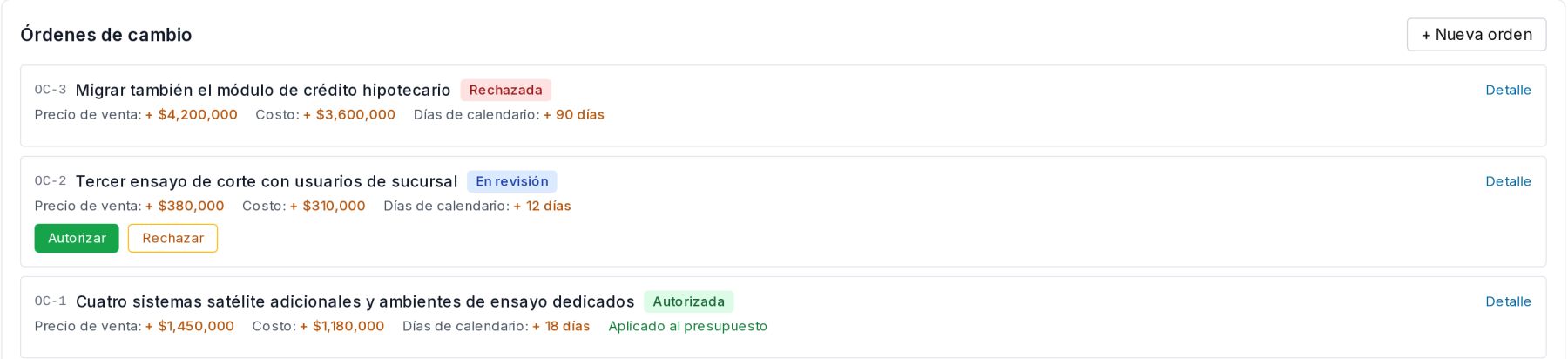
“We agreed to add the module” in an email is not change control. Record each request with its number and its impacts in figures: sales price, cost, calendar days, and in text, what enters and leaves the scope and the team. Someone with the authority to do so decides (the project manager or the sponsor), and rejected requests are recorded too: they explain later why the project does not include something.
6. Measure variance against the current reference, and review the detail
The variance dashboard should tell you at a glance how many days, hours and dollars have moved relative to the current baseline, and how much scope was added, removed or modified. A deleted task is not lost data: it is a variance that must be reported. Review the task-by-task comparison before the status meeting, not during it.
7. Milestones are what the Gantt shows; make them match the baseline
The committee does not review three hundred tasks: it looks at milestones. If the milestones on the Gantt and in the baseline are not the same, every meeting starts by arguing about which date counts. Define few milestones, give them real dependencies and always compare them against the frozen reference.
How it looks in Iurefficient
In each project, the Changes section (turned on in Edit project, dashboard sections) brings this discipline together. A New baseline button freezes the plan, and above it the Variances against the baseline board shows schedule, effort, planned cost and scope, each with its difference.

Below are the change orders, each with its number and impacts. Only those under review show the buttons to authorize or reject, and one already authorized is marked as applied to the budget. On authorization, the previous baseline is saved and the new one becomes current; the original plan is always kept as version 1.
¿Quieres ver Iurefficient en acción?
Agenda una demostración o empieza tu prueba gratuita hoy mismo.
Solicitar demo