Change control: scope moves, the promise stays in writing

Almost every project changes. Seven practices so scope can move without losing what was agreed: a number, impacts, who approves and a budget that really gets updated.
Almost every project changes. The problem isn't the change; it's that it gets agreed in a hallway, in a chat or at the end of a meeting, and three weeks later nobody remembers who asked for it, what it cost or who said yes. Then scope grows, the original budget still says the same thing, and the conversation with the client becomes “I thought that was included.”
Here are seven practices so scope can move while the promise stays in writing.
1. Save the picture of what was approved first
Without a baseline there is no change to measure: just a plan that “kept drifting.” Before execution starts, freeze dates, effort, planned cost and scope as they were approved. That snapshot isn't touched up to make numbers look better; it is replaced only when an approved change says so, and the original is kept.
2. Every change request comes through the same door
It doesn't matter whether the client, the sponsor or the team itself asked: it is logged as a request with a number. Simple rule: no number, no change. That avoids the “tiny” favor that, added to ten others, is what sinks the project.
3. Every request declares its impacts, not just a description
Describing the change is the easy part. The impact analysis is what decides, and it helps if it always covers the same lines:
- Sell price: how much more (or less) the client is charged.
- Cost: what it costs to deliver.
- Schedule: how many days it moves the end date.
- Deliverables: what comes into and out of scope.
- Team: who has to spend time on it and where that time comes from.
A request with only a description is a wish, not an analysis. So is one with a single option: always ask for the do-nothing alternative and, where it applies, a partial version.
4. Separate who asks, who reviews and who approves
The PM submits the request with the analysis; the PMO checks the analysis is complete; approval belongs to whoever answers for the project and the money (the project owner, the sponsor or a committee, depending on size). Being able to see a request shouldn't mean being able to decide it. On small projects these can be two people, but they shouldn't be one.
5. Approving should change the budget, not just the document
This is the most common mistake: a paper that says “+ $380,000 and 12 days” gets signed and the project budget keeps the original figure. From then on, every comparison between planned and spent is wrong. On approval, the approved cost is added to the budget, the sell price to the contract value, and the baseline is renewed. If your tool doesn't do this by itself, make it a mandatory closing step of the order.
6. A rejection leaves a record too
A rejected request with its reason is valuable: it answers “why wasn't this done?” and avoids relitigating the same thing every quarter. Same for deferred ones: they stay in the log with a review date, not in someone's memory.
7. A decided order is not edited
The change log is the proof of what was agreed. If an approved order can be rewritten months later, it stops being proof. If something needs fixing, raise a new order that corrects it. And review the whole log when the project closes: it is raw material for lessons learned and better estimates.
How it looks in Iurefficient
In each project, the Changes section brings both halves together. At the top, the variance against the current baseline: schedule, effort, planned cost and scope, with before, after and difference.

Below, the change orders, each with its number and impacts (sell price, cost and calendar days, plus deliverables and team). An order in review offers Approve and Reject; an approved one shows it was applied to the budget, and a rejected one stays in the list with its status.
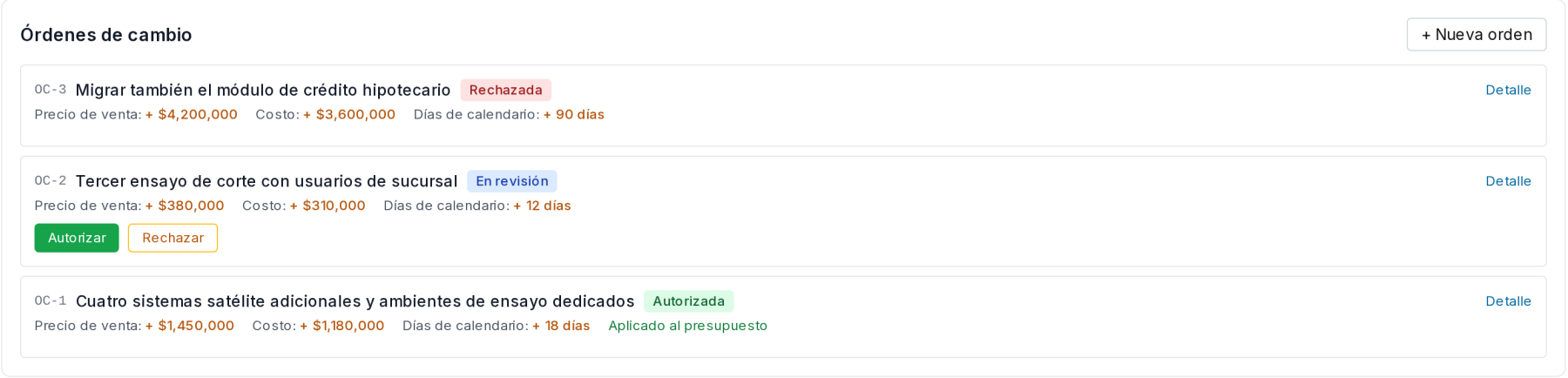
The project owner or an administrator decides, and an order that has been decided can be neither edited nor deleted. On approval the previous baseline is saved, the changes are applied and a new one is taken; the original plan always stays as version 1. The data in the screenshots is from a demo.
¿Quieres ver Iurefficient en acción?
Agenda una demostración o empieza tu prueba gratuita hoy mismo.
Solicitar demo