Who can take on more? Planning with your team’s real capacity

Planning with the capacity we think we have, instead of the capacity we actually have, is the fastest way to burn out a team. Seven practices for a PMO to decide with data who can take on more.
In almost every PMO, the Monday conversation sounds the same: a new project wants to start, someone asks who can take it, and the answer comes from the memory of whoever is in charge. “Ana has room,” “Carlos is almost done with the bank project.” Two weeks later, Ana is working nights and the bank project was not done after all. The problem is not a lack of willingness: it is planning with the capacity we think we have, not the capacity we actually have.
These are the practices that separate a portfolio that holds up from one that lives fighting fires.
1. Measure capacity in real hours, not theoretical workdays
A person hired for 40 hours does not have 40 hours for projects. There are internal meetings, support, training, vacations and admin work. If you do not subtract them, every plan is born overloaded.
- Set a weekly capacity per person that reflects what is actually available for projects (30–32 hours is usually more honest than 40).
- Adjust it for people with fixed duties: a tech lead on call does not have the same availability as a dedicated consultant.
- Subtract known absences: an approved vacation week is a week with zero capacity, even if the person keeps their tasks.
2. Add up the load from every project, not just one
The most common mistake is reviewing load project by project. Each manager sees their team at 60% and concludes there is slack, but the same person appears in three projects and is at 140% overall. Load only makes sense when seen per person and per week, across the whole portfolio.
3. Estimate hours on tasks, or there will be nothing to measure
A workload map is only as good as the estimates feeding it. A task with no estimated hours weighs nothing in any calculation, and a team with half its tasks unestimated will always look available.
- Ask for a rough estimate (4, 8, 16, 40 hours) as soon as the task is created; refining it later is easier than inventing it at the end.
- Regularly check what share of open work has no estimate: it tells you how blind the portfolio is.
- Compare estimated against actual when phases close. If a type of task always doubles, the next estimate should reflect it.
4. Use thresholds and colors everyone reads the same way
“Overloaded” means different things to different people. Agreeing on ranges ends the debate: for example, under 70% is slack, 70 to 100% is balanced, 100 to 120% is at the limit and over 120% is overloaded. The exact number matters less than the committee reading the same traffic light, and a red cell forcing a decision, not a comment.
5. Plan with roles before you have names
At kickoff, a project rarely has its full team: you know you need “two functional consultants and an architect,” not who. The temptation is to create a generic user or assign everything to the manager “for now.” Both pollute the data: the fake user shows up in reports and the manager looks swamped.
- Declare needs as roles with an estimated rate, so planned cost is real from day one.
- Treat that demand for what it is: work to be filled. It is the most useful signal a PMO has for deciding whom to hire, free up or reassign.
- When the person arrives, let them inherit the role’s tasks and terms instead of reassigning task by task.
6. Look several weeks ahead
This week’s overload can no longer be avoided; the one five weeks out can. Review a six- to eight-week horizon and spot the peaks before they arrive: a delivery that lands on another project’s close, one person carrying the final phase for two clients. Moving a start date a month in advance is cheap; doing it the week of the peak is not.
7. Make capacity a committee decision
Accepting a new project without looking at capacity is silently deciding that another project will slip. Bring the workload map to the portfolio meeting and turn every overload into one of three explicit decisions:
- Move dates or phases that are not critical.
- Reassign work to someone with slack and the right profile.
- Add capacity: hire, subcontract or postpone the incoming project.
What is not an option is leaving the cell red and hoping the team sorts it out with overtime.
How it looks in Iurefficient
In the Portfolio, the Workload balancing tab shows a heat map per person and week with load against each person’s capacity, adding up every project. Green is slack, blue balanced, amber at the limit and red overloaded; you pick the horizon in weeks, adjust weekly capacity with “Edit capacities,” and clicking a cell shows which tasks fill that week. Load is spread between each task’s start and end dates according to the assignee’s working days.
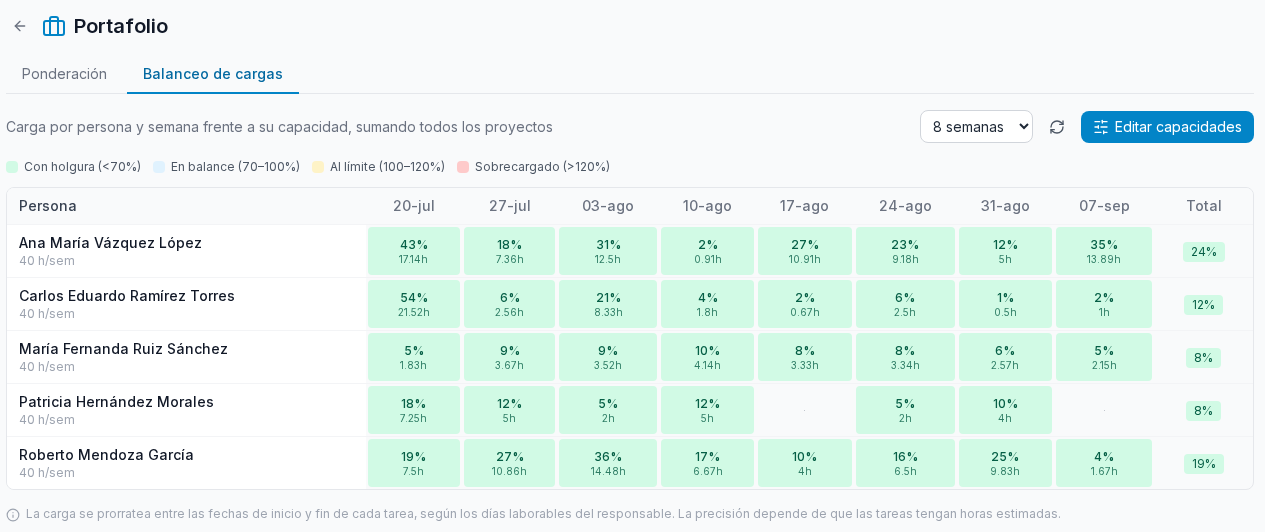
To plan before you have names, a task can request a role instead of a person, and the role is declared as an open seat on the project team with its own rate, marked as unfilled. That demand appears in the workload map on separate rows, charged to no one, and counts in the budget from day one. When the person arrives, they take the seat and inherit its tasks and agreed rate.
¿Quieres ver Iurefficient en acción?
Agenda una demostración o empieza tu prueba gratuita hoy mismo.
Solicitar demo