Law firm templates and forms: write equally well every time

A brief with the previous client’s name on page seven isn’t bad luck: it’s a template system that doesn’t exist. Seven practices so your firm writes equally well no matter who drafts.
Almost every law firm has a “good” professional-services agreement template… and five others circulating by email, each with a different fix. Whoever drafts grabs the closest one, swaps names with find-and-replace and hopes nothing slips through. That is how a brief goes out with the previous client’s name on page seven, or citing a code that has already changed.
A good template system isn’t bureaucracy: it’s how a firm writes equally well no matter who drafts or at what hour. These are the practices that make the biggest difference.
1. One official catalog, with an owner
If the current template lives on someone’s computer, it doesn’t belong to the firm. Keep templates in a single catalog and give each one an owner: the person who reviews it and the only one who approves changes.
- Each template shows the date of its last review and who did it.
- Older versions are kept, but they aren’t offered for drafting.
- A template nobody is willing to own probably shouldn’t be in the catalog.
2. Explicit blanks, not find-and-replace
Starting from the last signed contract and changing names is the classic recipe for leaking one client’s information into another’s document, which also compromises attorney–client confidentiality. A template should start clean, with visible blanks for every variable item: [CLIENT NAME], [TAX ID], [AMOUNT], [DATE].
- Blanks stand out at a glance and are easy to search for before delivery.
- If a fact isn’t known yet, it stays marked as pending instead of being guessed or left over from the previous matter.
3. The judgment goes inside the template
The difference between a partner’s brief and an intern’s rarely lies in the letterhead: it lies in knowing what belongs in each section. Write that judgment next to the template: what the statement of facts must contain, which sources take priority in the legal argument, what is never asserted without a supporting document.
A template with per-section instructions turns the firm’s experience into something that can be passed on, and reduces review to fixing substance, not form.
4. Regular legal review
Templates age with the law. A current example from Mexico: the National Code of Civil and Family Procedure, published in the Official Gazette (DOF) on June 7, 2023, is gradually replacing each state’s civil and family procedure codes, according to the declaration issued by each state legislature. A complaint that cites the local code in a state where the national code already applies is poorly grounded from page one.
- Schedule a review of procedural templates whenever the applicable law changes and, at minimum, once a year.
- Note on each template which jurisdiction and practice area it is for.
5. Visual identity in the template, not in each document
Letterhead, logo, fonts and margins are defined once in the firm’s Word template, with the logo in the header rather than pasted into the body. That way every new document comes out properly presented and nobody wastes time fixing margins before a filing.
6. A final review checklist before delivery
Each template should carry its own short checklist. For example:
- No blank is left unfilled and no item remains marked as pending.
- Names, amounts in figures and words, and dates match throughout the document.
- Cited articles were checked against their current text.
- Comments, tracked changes and file metadata were removed before sending to the other side.
7. Your best work feeds the catalog
When a brief worked especially well, turn it into a template: strip the matter’s details, leave the blanks and run it past the owner’s review. The catalog grows with what the firm has already proven works, instead of with downloaded models nobody has tested.
How it looks in Iurefficient
In Iurefficient the firm’s templates live in one place, Document templates. Each template can hold the format file (the Word document with letterhead), per-section instructions for the AI, or both, and is classified by document type.
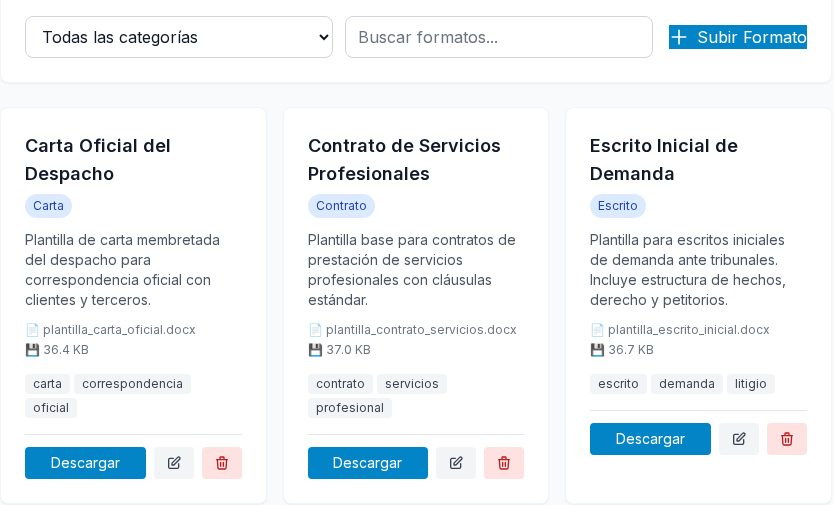
When you use a template, the system asks whether you want it blank to fill in yourself or drafted by the AI. On a document in the file, the Analyze with AI action offers to generate a new document with one of the firm’s templates: it is drafted section by section following each section’s instructions, comes out with the template’s letterhead and margins, and anything the material doesn’t support is flagged for review instead of being made up. If the format has blanks such as {{fecha}} or {{acuerdos}}, the body of the format is kept exactly as is and only the blanks are filled.
You can also turn one of your own documents into a template: the system replaces personal data with placeholders such as [NOMBRE] or [MONTO] before saving it to the catalog.
This article is for information only and is not a substitute for professional advice on a specific case.
¿Quieres ver Iurefficient en acción?
Agenda una demostración o empieza tu prueba gratuita hoy mismo.
Solicitar demo