Profitability per project: hours, rates and budget in plain sight

Most firms know how much they invoiced and almost none know how much each project made. Seven practices to see the margin while the project is still alive.
In a consulting firm almost everyone knows how much was invoiced last month, and almost no one knows how much each project actually made. The number shows up at closing, when nothing can be fixed any more: the “star” project turns out to be the one that burned the most unbilled hours. These practices let you see profitability while the project is still alive.
1. Keep the cost rate separate from the billing rate
Every person has two numbers: what an hour of their time costs the firm (salary, benefits and whatever share of overhead you decide to allocate) and what the client is charged for that hour. Mixing them up is the source of most wishful accounting. A senior consultant billed at 1,800 an hour who costs 950 leaves a very different margin from an analyst billed at 900 who costs 400, even though both appear in the proposal as “consulting hours”.
Review cost rates at least once a year and whenever salaries change. A margin computed with the cost from two years ago is fiction.
2. Budget in hours per role before you know who will do the work
When you quote, you rarely know the full team. What you do know is which roles are needed: so many partner hours, so many senior consultant hours, so many analyst hours. Budgeting by role, each with its rate, gives you a planned cost from day one and shows which positions are still unfilled.
Once a person is assigned, their actual rate replaces the role’s. If the gap is large (an analyst was planned and a senior ended up on the job), you want to see it that same day, not at closing.
3. Hours are logged every week, not at month end
Hours rebuilt from memory on the 30th are always rounded, and always in favor of the project the consultant remembers best. The rule that works is simple:
- Each person logs their hours during the week and submits them when it closes.
- Someone else reviews them and approves them or returns them with a reason.
- No one approves their own hours, partners included.
What matters is the habit. A Monday reminder to the people who have work to report achieves more than any scolding in the monthly meeting.
4. Log what you will not bill, too
On fixed-price projects the temptation is to skip the extra hours “because they are not invoiced anyway”. It is the other way round: those hours are the most valuable information the firm has. They tell you what the deliverable really cost and what you should quote next time. Mark each hour as billable or non-billable, but log all of them, including rework, pre-sales that dragged on and internal project meetings.
5. Compare planned against actual every week
With hours up to date, the review takes five minutes per project and fits in the weekly meeting. Three numbers are enough:
- Planned cost: estimated hours times rate, plus fixed costs.
- Actual cost: logged time plus expenses.
- Progress: how much of the work is finished.
If 60% of the budget is spent and progress stands at 35%, the project already has a problem even though there is “money left”. That comparison between what was spent and what was earned is what project management calls earned value, and it is the earliest warning you can get.
6. Expenses and scope changes have an owner and a date
Travel, licenses and subcontractors are charged to the project when they happen, with a category. Left for the end, they wipe out the margin in a single line nobody can explain.
The same goes for scope changes. Every “while you are here, could you also…?” accepted without a document is paid for with margin. An approved change should state how much it moves the cost and how much it moves the price, and be added to the budget. That keeps next week’s comparison honest.
7. Close every project with its number and use it to quote
At the end, write down the price, the actual cost, the margin and the two or three causes of the deviation. With ten projects closed this way, the firm knows which kind of work makes money, which client consumes more hours than it pays for, and how much to add to an assessment estimate to make it realistic. The next proposal is quoted with that data.
How it looks in Iurefficient
In Iurefficient every project has a Budget tab. It shows the budget, the planned cost (estimated hours times rate plus fixed costs), the actual cost (logged time plus expenses) and the amount invoiced, with a consumption bar and the planned cost broken down by person, with their rate and hours. (The screenshot shows the Spanish interface.)
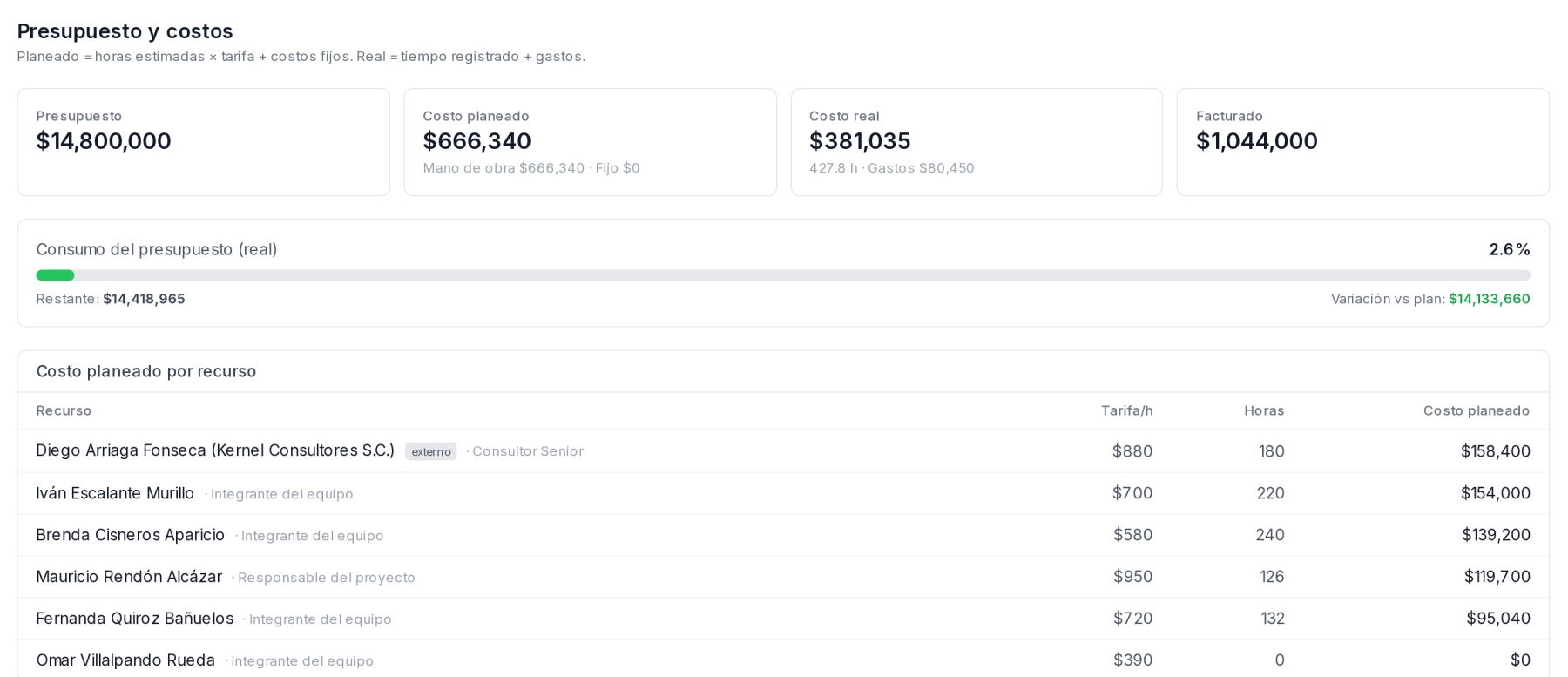
Actual hours come from My hours, the weekly sheet where each person logs time and submits their week, and a supervisor or administrator approves it or returns it with a reason. Rates can be set per person, per role in the catalog or for a specific project, so a project planned only with roles already has a planned cost. Approved change orders are added to the project budget, and the earned value panel compares progress and spend against the baseline. If the project has no rates, the system measures in hours and says so instead of making up a cost.
¿Quieres ver Iurefficient en acción?
Agenda una demostración o empieza tu prueba gratuita hoy mismo.
Solicitar demo