Your case file as just another drive on your computer

Open a contract from Word without downloading it, attach an exhibit from your file explorer, or keep your templates at hand on a plane. IureDav mounts a WebDAV server — or Iurefficient — as just another folder, and checks what it really does before mounting it.
In almost any firm, documents live in one system — a document manager, a cloud, a project platform — and the work happens in another: Word, Excel, the PDF reader, the file explorer. Between the two sits a ritual of downloading, editing, uploading again and renaming “final_v3_good.docx”. Mounting the repository as a network drive removes that ritual, as long as the drive doesn’t promise more than it can deliver.
IureDav is a desktop app (Linux, Windows and macOS) that mounts a WebDAV server as just another folder on your computer, Mountain Duck style, with a profile designed for Iurefficient. Its distinguishing trait: it doesn’t believe what the server advertises. It tests every operation, measures what really works, and from that decides how to mount the drive and what to explain to you when something can’t be done.
1. The problem it solves
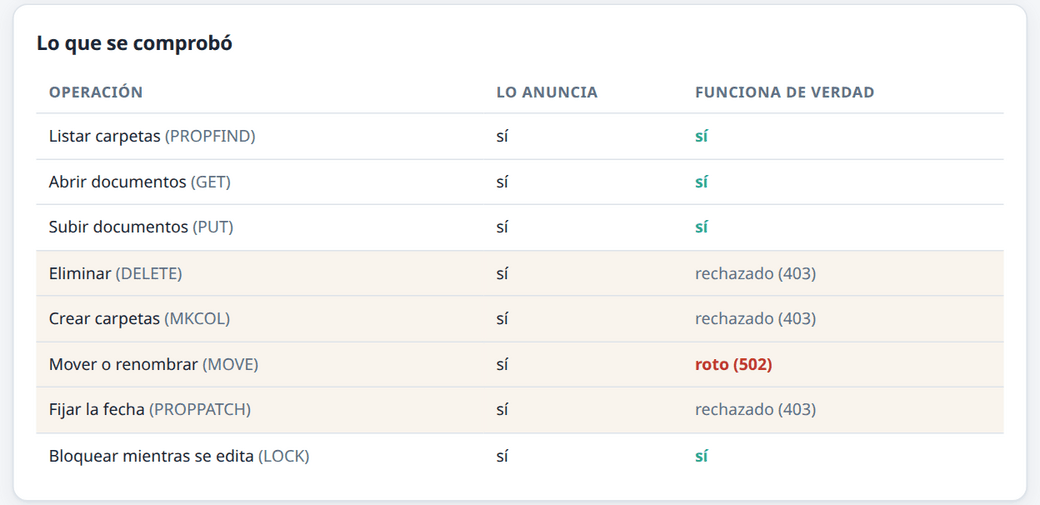
WebDAV is an old, widely supported standard, but every server implements it its own way. Many advertise that they allow deleting, moving or creating folders and then reject it. A client that trusts that advertisement plans with it and fails halfway through a copy or a rename, leaving the folder in a state nobody asked for. IureDav runs a probe: it tries listing, opening and partial reads and, if you ask, uploading, creating folders, moving, deleting, setting dates and locking. The measurement becomes the mount options.
2. How to use it, in five steps
- Download the installer from the latest release (
.exe/.msifor Windows, a universal.dmgfor macOS,.deb,.rpmor.AppImagefor Linux). On macOS and Windows there is nothing else to install: the mount engine ships inside and the Windows installer brings WinFsp. - Click Add connection and choose the server type: Iurefficient (just the domain) or another WebDAV over HTTPS (Nextcloud, ownCloud, Synology, Seafile…).
- With Iurefficient, sign in with your account: IureDav gets an app password in that computer’s name and stores it in the system keychain. You never see or copy the app password.
- Mount the drive. For safety it starts read-only; editing is turned on by hand and only if the probe confirmed that the server accepts uploads.
- Mark as available offline the folders you want to consult without internet: the firm’s templates, the case file for tomorrow’s hearing.
3. Good practices when mounting documents as a drive
Start read-only. It’s the best way to explore the tree without risk. Turn editing on when you need it and know what saving means on that server.
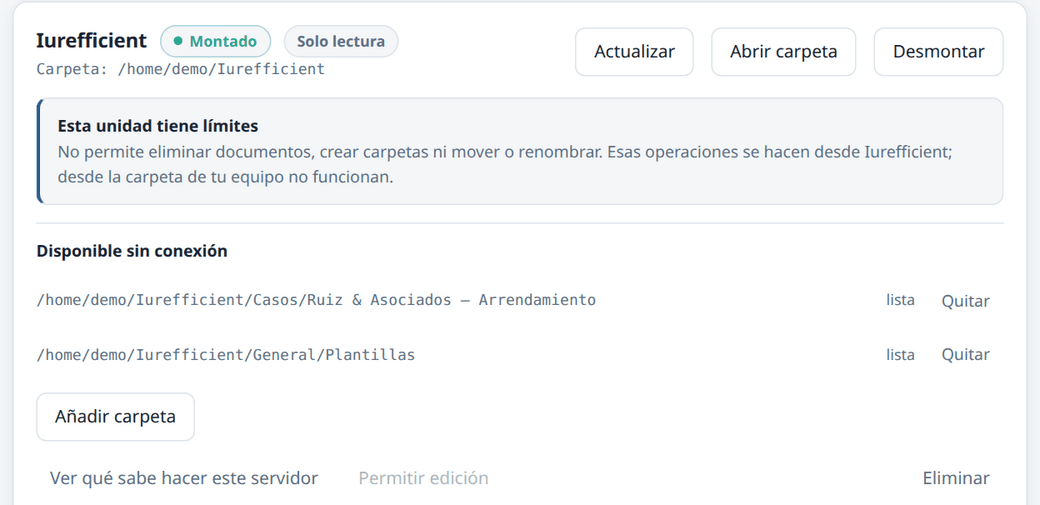
Read the limits before you work. IureDav translates them into plain language — “it doesn’t let you create folders; that’s done in Iurefficient” — instead of an error code. If something can’t be done from the drive, do it in the application and don’t keep trying from the file explorer.
Choose carefully what you take offline. Offline mode downloads the whole folder to a local cache; if the cache fills up, the oldest content can be pushed out. Mark what you will really need, not the entire root.
Credentials belong in the keychain. IureDav stores passwords in the operating system keychain, never in configuration files, and sends no telemetry.
4. Who it isn’t for (yet)
IureDav is in development, and that should be said plainly. According to its own documentation, the probe, mounting, the interface, the system tray, autostart, the installers and offline folders work, but it has only been tested thoroughly on Linux; Windows has had some real use and the macOS build hasn’t been run on a Mac yet. The installers aren’t code-signed, so Windows and macOS will show a warning the first time. Nor is it for servers that require NTLM (SharePoint) or OAuth: only basic authentication over HTTPS is supported.
How it connects with Iurefficient
Iurefficient exposes its documents over WebDAV (the instance administrator must have it enabled). With the Iurefficient profile you just type the domain; IureDav adds the WebDAV path and signs in with your account. The sign-in is shared with IureTranscribe, iureditor and IureOCR: if one of those apps already signed in, the form comes with the domain and email already filled in.
The See what this server can do screen sets, row by row, what the server advertises against what works. Against Iurefficient, listing, opening, uploading and locking work; deleting, creating folders and moving are done from the application, and saving over an existing document creates a new version instead of overwriting it, so the document’s history is preserved.
IureDav is free software (Apache 2.0). The code and downloads are at github.com/ellaguno/iuredav; if you try it on Windows or macOS, bug reports are especially welcome.
¿Quieres ver Iurefficient en acción?
Agenda una demostración o empieza tu prueba gratuita hoy mismo.
Solicitar demo